install.packages(c("pak", "tidyverse"))
pak::pak("tidyverse/vitals")
library(ellmer)
library(vitals)
library(tidyverse)
vitals_log_dir_set("logs")
1 Model evalutation
1.1 Arithmetic
Suppose we have the following dataset with arithmetic problems and their answers:
arithmetic_dataset <- tibble(
  input = c(
    "What's 2+2?",
    "What's 2 minus 3?",
    "What's 2 times 4?",
    "What is 5 plus 3?",
    "Can you tell me what 12 minus 4 is?",
    "How much is 6 times 7?",
    "What's 81 divided by 9?",
    "Add 15 and 27",
    "Subtract 20 from 50",
    "Multiply 8 by 6",
    "Divide 100 by 4",
    "What do you get if you add 13 to 29?",
    "Take 45 and subtract 17"
  ),
  target = c(
    2 + 2,
    2 - 3,
    2 * 4,
    5 + 3,
    12 - 4,
    6 * 7,
    81 / 9,
    15 + 27,
    50 - 20,
    8 * 6,
    100 / 4,
    13 + 29,
    45 - 17
  )
)
Below we use llama3.1:8b model via ollama to answer the arithmetic problems.
chat_answer <- chat_ollama(model = "llama3.1:8b",
                           system_prompt = "Just return the answer.",
                           echo = "none",
                           seed = 1)

arithmetic_dataset |>
  mutate(answer = map_chr(input, ~{
    chat <- chat_answer$clone() # so previous conversation doesn't accumulate
    chat$chat(.x)
  })) |>
  mutate(correct = target == as.numeric(answer))
Warning: There was 1 warning in `mutate()`.
ℹ In argument: `correct = target == as.numeric(answer)`.
Caused by warning:
! NAs introduced by coercion# A tibble: 13 × 4
input target answer correct
<chr> <dbl> <chr> <lgl>
1 What's 2+2? 4 4 TRUE
2 What's 2 minus 3? -1 -1 TRUE
3 What's 2 times 4? 8 8. TRUE
4 What is 5 plus 3? 8 8 TRUE
5 Can you tell me what 12 minus 4 is? 8 7. FALSE
6 How much is 6 times 7? 42 36 FALSE
7 What's 81 divided by 9? 9 9. TRUE
8 Add 15 and 27 42 42 TRUE
9 Subtract 20 from 50 30 30 TRUE
10 Multiply 8 by 6 48 48 TRUE
11 Divide 100 by 4 25 25 TRUE
12 What do you get if you add 13 to 29? 42 37. FALSE
13 Take 45 and subtract 17 28 45 - 17 = 28 NA However, the above approach becomes an issue when the answer does not have to match exactly with the target. For example, if the answer is four but the target is 4, then the above code will return FALSE for correctness even though the answer is correct.
One way to overcome this is to use another LLM to grade the answers. We do this via the Task object in vitals package. The Task object allows us to define a dataset, a solver (an LLM that answers the problems), and a scorer ( another LLM that grades the answers).
chat_answer <- chat_ollama(model = "llama3.1:8b")
chat_grader <- chat_openai(model = "gpt-4.1")

tsk_arith <- Task$new(
  dataset = arithmetic_dataset,
  solver = generate(chat_answer),
  scorer = model_graded_qa(scorer_chat = chat_grader)
)
We then evaluate the task using the eval() method. This will run the LLM on each problem in the dataset and grade the answers.
tsk_arith$eval()If above is called interactively, then the results from vitals_view() will show in the browser.
vitals_view(dir = "task1")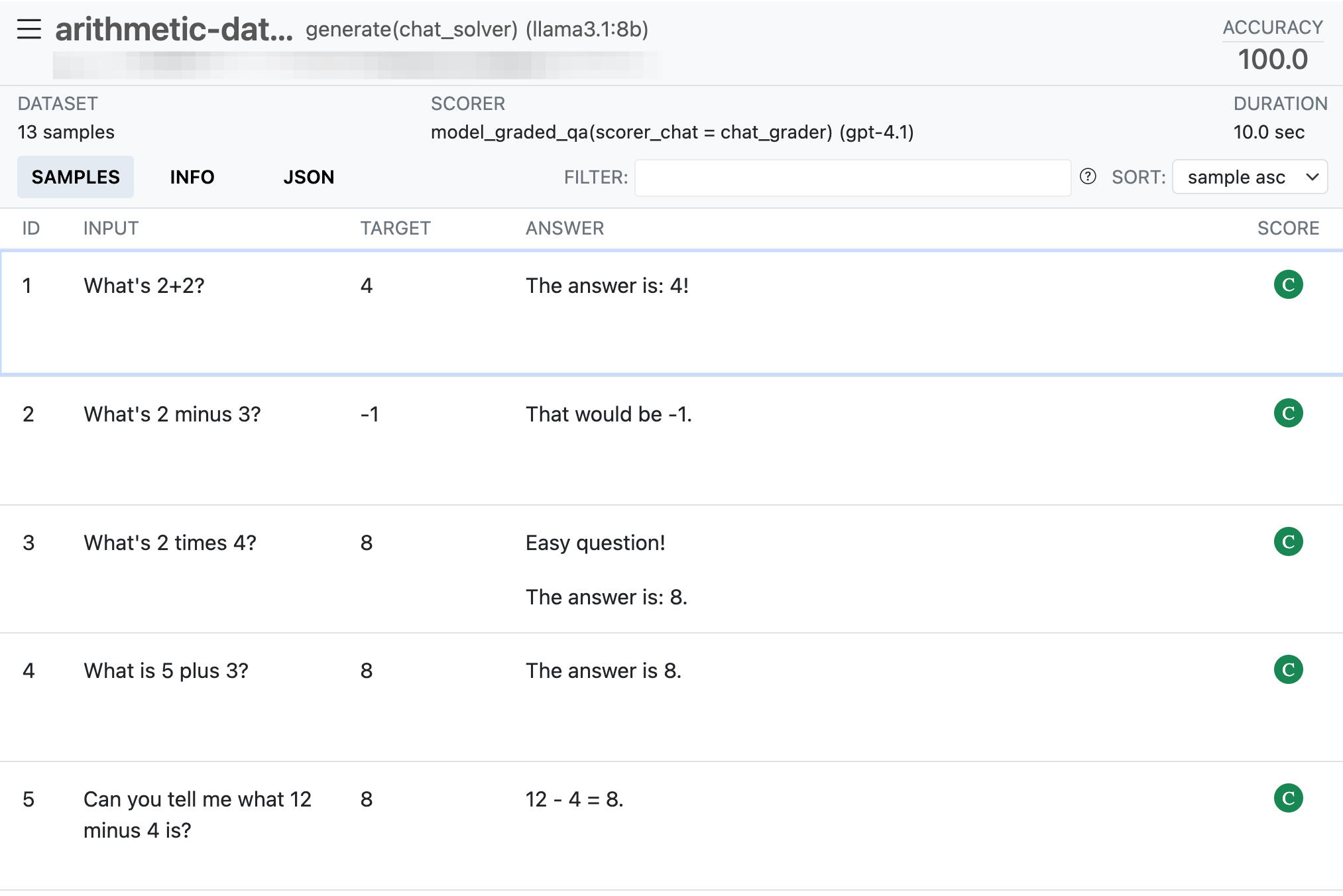
We can extract the results of the evaluation using vitals_bind() function:
vitals_bind(tsk_arith) # A tibble: 13 × 4
task id score metadata
<chr> <int> <ord> <list>
1 tsk_arith 1 C <tibble [1 × 7]>
2 tsk_arith 2 C <tibble [1 × 7]>
3 tsk_arith 3 C <tibble [1 × 7]>
4 tsk_arith 4 C <tibble [1 × 7]>
5 tsk_arith 5 C <tibble [1 × 7]>
6 tsk_arith 6 C <tibble [1 × 7]>
7 tsk_arith 7 C <tibble [1 × 7]>
8 tsk_arith 8 I <tibble [1 × 7]>
9 tsk_arith 9 C <tibble [1 × 7]>
10 tsk_arith 10 C <tibble [1 × 7]>
11 tsk_arith 11 C <tibble [1 × 7]>
12 tsk_arith 12 C <tibble [1 × 7]>
13 tsk_arith 13 C <tibble [1 × 7]>The score C show the correctness and the metadata contains information about the question, answer and target.
1.2 R coding problems
are is a dataset in vitals package that contains 25 challenging R coding problems. An example problem is shown below:
cat(are$input[1])This bar chart shows the count of different cuts of diamonds, and each bar is
stacked and filled according to clarity:
```
ggplot(data = diamonds) +
geom_bar(mapping = aes(x = cut, fill = clarity))
```
Could you change this code so that the proportion of diamonds with a given cut
corresponds to the bar height and not the count? Each bar should still be
filled according to clarity.And the suggested answer for this is:
cat(are$target[1])Preferably:
```
ggplot(data = diamonds) +
geom_bar(aes(x = cut, y = after_stat(count) / sum(after_stat(count)), fill = clarity))
```
The dot-dot notation (`..count..`) was deprecated in ggplot2 3.4.0, but it
still works:
```
ggplot(data = diamonds) +
geom_bar(aes(x = cut, y = ..count.. / sum(..count..), fill = clarity))
```
Simply setting `position = "fill" will result in each bar having a height of 1
and is not correct.Since it takes long to do all, let’s have a look at just the first problem.
tsk_are_ollama <- Task$new(
  dataset = slice(are, 1),
  solver = generate(chat_ollama(model = "llama3.1:8b")),
  scorer = model_graded_qa(partial_credit = TRUE, scorer_chat = chat_grader),
  name = "An R Eval"
)

tsk_are_ollama$eval()

sol1 <- vitals_bind(tsk_are_ollama) |>
  pull(metadata) |>
  pluck(1)

# the answer
cat(sol1$result)
You can use `ggplot2`'s built-in facility for creating stacked bar charts, but also specify the unit area of each group so that the resulting heights correspond to proportions rather than counts.
Here's how you can do it:
```r
library(ggplot2)
ggplot(data = diamonds) +
geom_bar(aes(x = cut), position = "fill") +
aes(fill = clarity) +
scale_fill_discrete()
```
In the `geom_bar()` layer, we've changed `position = "dodge"` to `position = "fill", which tells ggplot2 that each group (cut category) should share the same x position and instead use the specified fill aesthetic for ordering them. By default, when `bar_position` is set to `"fill"`, geom_bar estimates a total area from all geoms in the layer, then scales by this amount. So now every bar will get stacked up to a size determined by the cut proportion, resulting in heights that reflect proportions rather than counts.# it didn't get it correct according to our grader
vitals_bind(tsk_are_ollama) |>
pull(score)[1] I
Levels: I < P < CTry another problem in the are to see if it gets right.
🎉 Ah! You’ve reached the end of this exercise! You are super-excellent! Proceed to …