Effective tables
STAT1003 – Statistical Techniques
Dr. Emi Tanaka
Australian National University
These slides are best viewed on a modern browser like Google Chrome on a desktop or laptop. Some interactive components may require some time to fully load.
Table 1
“Table 1” is most commonly the first table in a scientific or medical research paper, providing a summary of the study population’s baseline characteristics (demographics, health metrics) stratified by group.
| Adelie (N=152) |
Chinstrap (N=68) |
Gentoo (N=124) |
Overall (N=344) |
|
|---|---|---|---|---|
| Body mass (g) | ||||
| Mean (SD) | 3700 (459) | 3730 (384) | 5080 (504) | 4200 (802) |
| Median [Min, Max] | 3700 [2850, 4780] | 3700 [2700, 4800] | 5000 [3950, 6300] | 4050 [2700, 6300] |
| Missing | 1 (0.7%) | 0 (0%) | 1 (0.8%) | 2 (0.6%) |
| Sex | ||||
| Female | 73 (48.0%) | 34 (50.0%) | 58 (46.8%) | 165 (48.0%) |
| Male | 73 (48.0%) | 34 (50.0%) | 61 (49.2%) | 168 (48.8%) |
| Missing | 6 (3.9%) | 0 (0%) | 5 (4.0%) | 11 (3.2%) |
What statistics to present?
What statistics to present depends on what you want to convey and your audience.
There are two key purposes of the table:
- display information; and
- communicate information.
- In general, tables tend to be about display of information and graphs are preferred for communication.
- However, if precision matters then tables can be better at communicating this than graphs.
- Numerical summaries should convey the characteristics of the data, and the relationships between variables, that are relevant to the question at hand.
Contingency tables
Contingency table (also called cross-tabulation) is a type of table that displays the frequency distribution of variables, often used to explore the relationship between two or more categorical variables.
| Island/Species | Adelie | Chinstrap | Gentoo | Total |
|---|---|---|---|---|
| Biscoe | 12.8% (44) | 0.0% (0) | 36.0% (124) | 48.8% (168) |
| Dream | 16.3% (56) | 19.8% (68) | 0.0% (0) | 36.0% (124) |
| Torgersen | 15.1% (52) | 0.0% (0) | 0.0% (0) | 15.1% (52) |
| Total | 44.2% (152) | 19.8% (68) | 36.0% (124) | 100.0% (344) |
Numerical precision
Select an appropriate precision for your goal and audience.
Average Body Mass (g)
|
|||
|---|---|---|---|
| Species | 5 d.p. | 2 d.p. | 0 d.p. |
| Adelie | 3,700.66225 | 3700.66 | 3701 |
| Gentoo | 5,076.01626 | 5076.02 | 5076 |
| Chinstrap | 3,733.08824 | 3733.09 | 3733 |
Trailing zeroes
Display trailing zeroes to match selected precision of the column.
Trailing zeroes
|
|
|---|---|
| Yes | No |
| 0.233 | 0.233 |
| 0.320 | 0.32 |
| 0.400 | 0.4 |
| 0.343 | 0.343 |
Measurement units
Change and display units as appropriate.
Average body mass
|
|||||
|---|---|---|---|---|---|
| Species | (g) | (mg) | (mg) | (tonnes) | (lbs) |
| Adelie | 3700.662 | 3700662 | 3,700,662 | 3.70e-03 | 8.2 |
| Gentoo | 5076.016 | 5076016 | 5,076,016 | 5.08e-03 | 11.2 |
| Chinstrap | 3733.088 | 3733088 | 3,733,088 | 3.73e-03 | 8.2 |
- Show comma every 3 digits (or other marks as needed).
E.g.1000000is harder to read than1,000,000.
Font and Column Alignment
To make it easier to read and compare values across rows:
- use a fixed-width font (e.g. Courier New, Menlo)
- Spanner labels are usually aligned in center
- Right-align numbers
- Left-align texts
Species
|
Body mass (lbs)
|
||||||
|---|---|---|---|---|---|---|---|
| Left | Center | Right | Left | Center | Right | Variable-width | Fixed-width |
| Adelie | Adelie | Adelie | 8.159 | 8.159 | 8.159 | 8.159 | 8.159 |
| Gentoo | Gentoo | Gentoo | 11.191 | 11.191 | 11.191 | 11.191 | 11.191 |
| Chinstrap | Chinstrap | Chinstrap | 8.230 | 8.230 | 8.230 | 8.230 | 8.230 |
Labels within tables
- It is possibly obvious, but tables designed as final product (e.g. in report) should have polished labels.
- For columns, the unit may be written in the column header label.
- You shouldn’t label the unit within the table.
| Species | Average body mass (g) | Average flipper length (mm) |
|---|---|---|
| Adelie | 3700.7 | 190.0 |
| Gentoo | 5076.0 | 217.2 |
| Chinstrap | 3733.1 | 195.8 |
| Species | Average body mass | Average flipper length |
|---|---|---|
| Adelie | 3700.7 g | 190.0 mm |
| Gentoo | 5076.0 g | 217.2 mm |
| Chinstrap | 3733.1 g | 195.8 mm |
Texts accompanying tables
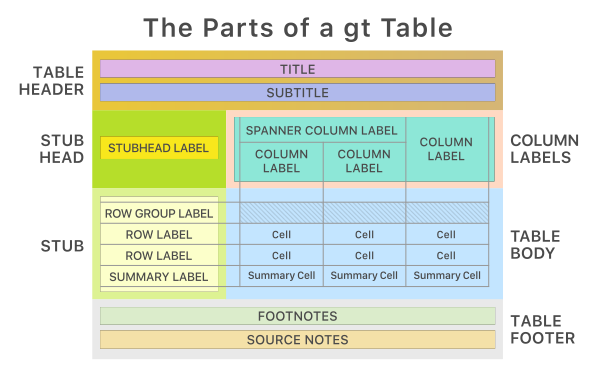
- Besides the contents of table, a table may be accompanied with: table header, caption, footnotes and/or source notes.
- The conventions of how and what to write will depend on your audience and medium of report
- Generally if you are communicating information, your caption should:
- summarise the take-away message, in other words, why should the audience care about this table?
- give context of the table (e.g. “\(R_0 > 1\) means that the virus is more infectious”)
🏗️ How to make tables in R?
There are many packages that make table in R, including ones that wrangle the data for you to make specialised table output. E.g.
kableExtra,formattable,gt,DT,pander,modelsummary,gtsummary,gtExtras.Some packages are designed to work with specific output formats (e.g.
kableExtraworks well with HTML and PDF output, but not with Word output). So you may want to choose a package that is compatible with your intended output format.You can read the documentation for each packages to make the table you want.
Let us know in the dicussion forum if you have a favorite package for making tables!
When do you make tables over plots?
When you want to show exact values or the accuracy of the values are important to convey.
You can combine plots with tables!
Summary
- Effective tables are designed to display and communicate information clearly and efficiently, using appropriate statistics, formatting, and accompanying texts to enhance understanding.
- Ensure to use fixed-width fonts, right-align numbers, and left-align texts for better readability.
- Use appropriate precision and units, and avoid redundant labels within the table.
- When communicating information, include captions that summarise the key message and provide context for the table.
- Consider using tables when exact values or precision are important, and combine with plots when appropriate to enhance communication.
- There are many R packages available for creating tables, so choose one that suits your needs and intended output format.
- Always consider your audience and the purpose of the table when designing it, to ensure it effectively conveys the intended information.

STAT1003 – Statistical Techniques