Data manipulation
STAT1003 – Statistical Techniques
Dr. Emi Tanaka
Australian National University
These slides are best viewed on a modern browser like Google Chrome on a desktop or laptop. Some interactive components may require some time to fully load.
Data Manipulation
- Data doesn’t always come in a tidy format.
- The cell in a tidy data may contain multiple values or may need to be reformatted.
- E.g.
- Strings may contain extra whitespace, inconsistent casing, or other irregularities that need to be addressed.
- Factors may need to be relevelled or relabelled.
- Dates and times may need to be parsed or reformatted.
Manipulating Strings
What are strings?
- Strings are sequences of characters enclosed in quotes
- In R, strings can use single
'or double"quotes
- What if you want to add quotes in the string then?
Special strings
- How to specify both single and double quote then?
- What if you want to write backslash then?
- Or just use the raw string (from R version 4.0.0)
Manipulating strings
The string may be manipulated using Base R functions, e.g.
paste0(),strsplit()But instead we use the
stringrpackage from the Tidyverse.stringrpackage is powered by thestringipackage, which in turn uses the ICU C library to provide fast performance for string manipulation.Main functions in stringr prefix with
str_(stringiprefix withstri_) and the first argument is a string (or a vector of strings)What do you think
str_trimandstr_squishdo?
Why use stringr?
- Let’s consider combining multiple strings into one:
stringrensures consistency in syntax and user expectation
- E.g. missing values in the data can have different expected results
Basic string operations
Pattern matching
- Suppose we have a variable
addressthat is comprised of street number, street name, suburb, state (or territory), and postcode.
- You can see the pattern is like:
<street number> <street name>, <suburb> <state> <postcode>[digits] [alphabets], [alphabets] [NSW|VIC|WA|ACT|QLD|SA|NT|TAS] [4 digits]
Regular expressions
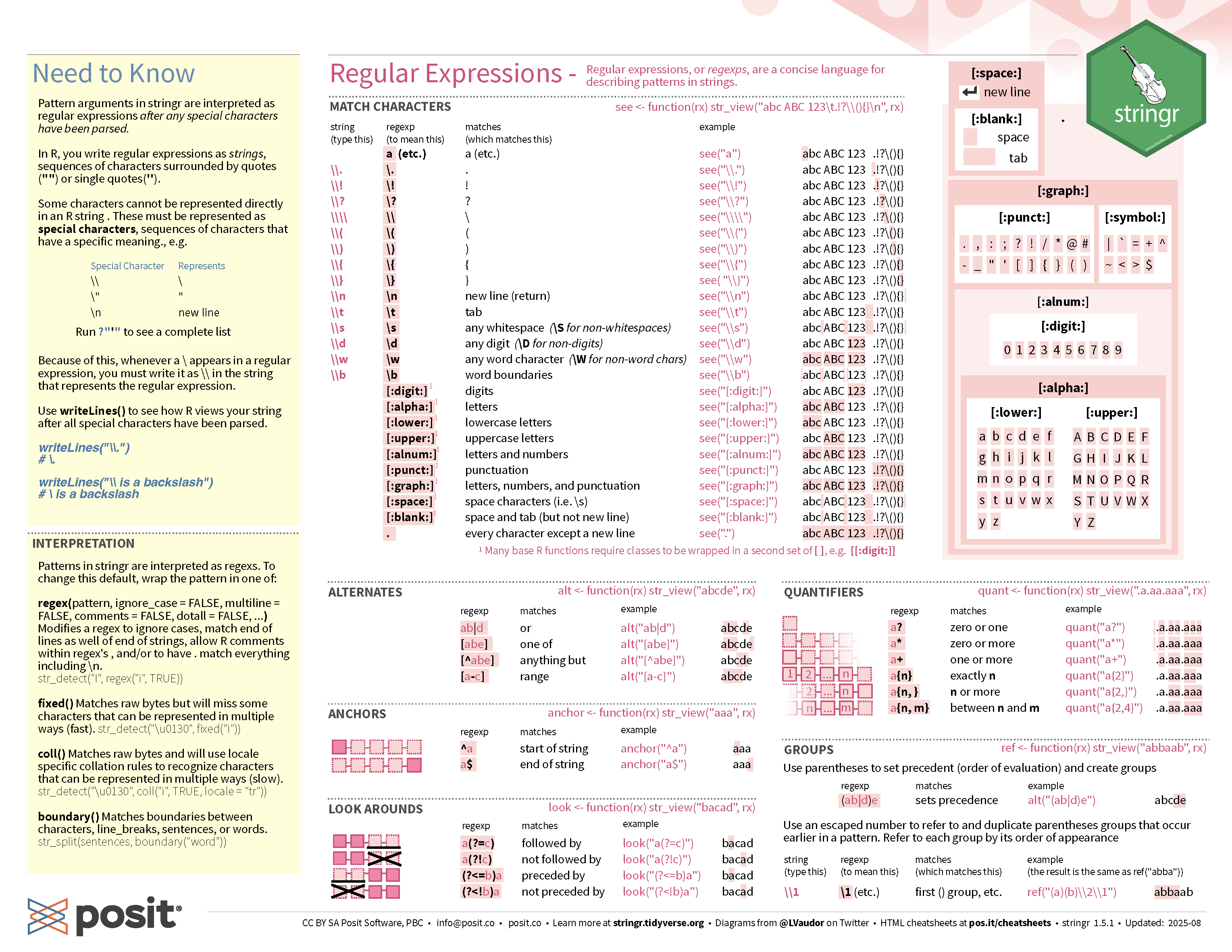
- Regular expressions, or regex, is a string of characters that define a search pattern.
[:digit:]or[0-9]matches any digit (0-9).matches any single character[:alpha:]or[A-Za-z]matches any alphabetic character (a-z, A-Z)+matches 1 or more of the preceding character(and)are used to create capture groups|acts as a logical OR{n}matches exactlynoccurrences of the preceding character
Named capture groups
But in the context of data, it may be better to use the separate_wider_regex() from tidyr package.
Case study Australian Local Government Area
- The LGA names include the LGA status in the bracket:
- C = Cities
- B = Boroughs
- M = Municipalities
- RegC = Regional Councils
- A = Areas
- S = Shires
- T = Towns
- RC = Rural Cities
- DC = District Councils
- AC = Aboriginal Councils
🎯 Extract the LGA status from the data
Checking the pattern
- If regex is difficult for you, AI can help you with refining your pattern.
- But be sure to check if the pattern works for your data!
String interpolation
Recall: paste0(), paste() or stringr::str_c() can combine strings:
- Above works, but it can be more convenient to interpolate strings with
{}:
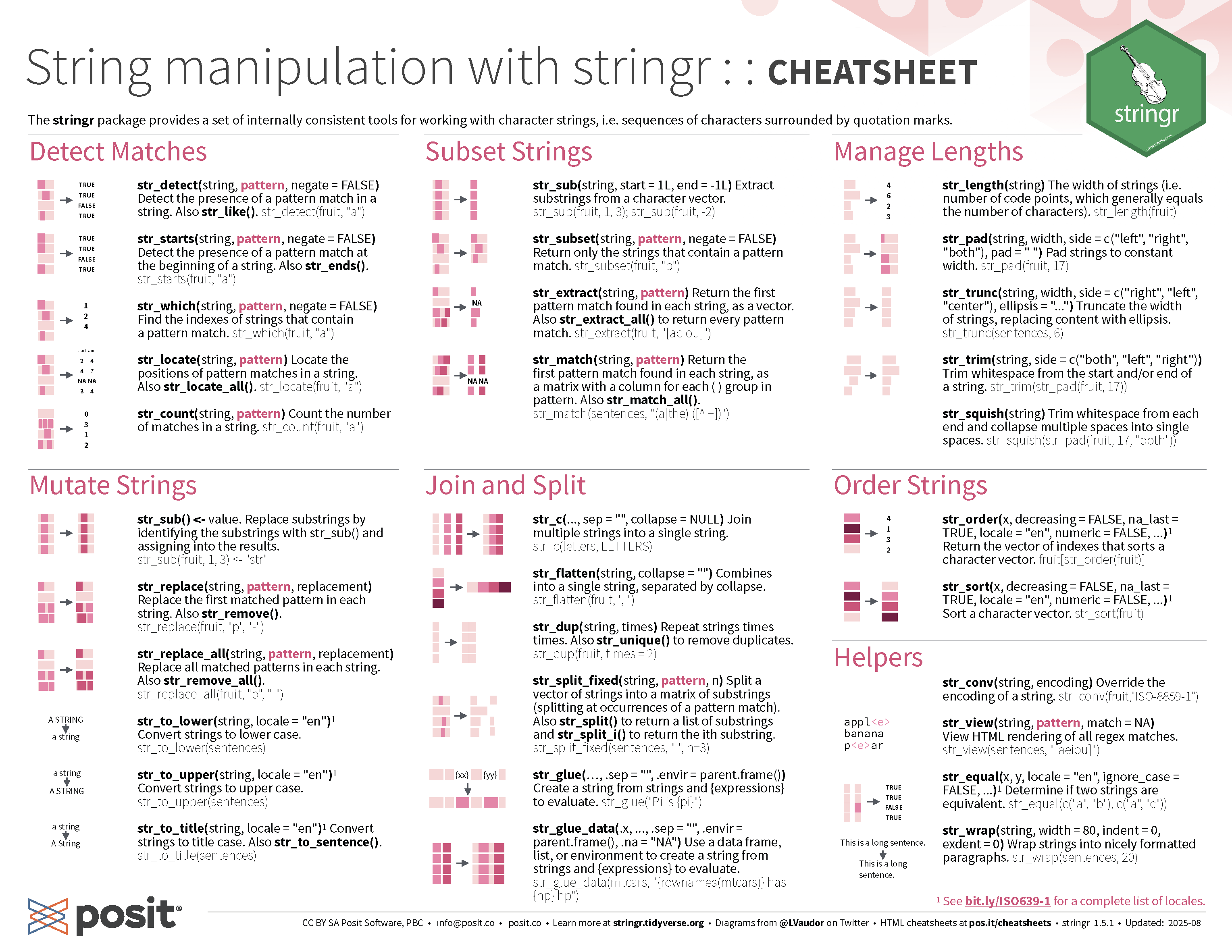
stringr cheatsheet
Formatting Factors
Categorical variables in R
- In R, categorical variables may be represented as factors.
- Then you have categorical variables that look like a numerical variable
(e.g. coded variables like say 1=male, 2=female) - And also those that have fixed levels of numerical values
(e.g.ToothGrowth$dose: 0.5, 1.0 and 2.0)
So why encode as [factor] instead of [character]?
- In some cases, characters are converted to factors (or vice-versa) in functions so there may be no difference.
- The main idea of a factor is that the variable has a fixed number of known levels.
- This can be useful for:
- Data integrity: It can help prevent errors by ensuring that only valid categories are used.
- Memory efficiency: Factors can be more memory efficient than character vectors, especially when there are many repeated values.
- Downstream analysis: A number of downstream analysis in R treat factors differently from characters.
Factors in R
- When a variable is encoded as a factor then there is an attribute with the levels
- You can easily change the labels of the variables:
- Or make it an ordered factor:
Order of the levels in a factor
- Order of the factors are determined by the input.
Why would the order of the levels matter?
- Some downstream analysis may use it.
Numerical factors in R
as.numeric function returns the internal integer values of the factor
You probably want to use:
Defining levels explicitly
- If the variable contain values that are not in the levels of the factors, then those values will become a missing value
- This can be useful at times, but it’s a good idea to check the values before it is transformed as
NA
Defining levels explicitly
- You can have levels that are not observed
- This can be useful at times downstream, e.g.
Formatting factors
- The
forcatspackage is part oftidyverse - Like the
stringrpackage the main functions inforcatsprefix withfct_orlvls_and the first argument is a factor (or a character) vector - The list of available commands are:
fct_anonfct_cfct_collapsefct_countfct_crossfct_dropfct_expandfct_explicit_nafct_infreq
fct_inorderfct_inseqfct_lumpfct_lump_lowfreqfct_lump_minfct_lump_nfct_lump_propfct_match
fct_na_level_to_valuefct_na_value_to_levelfct_otherfct_recodefct_relabelfct_relevelfct_reorderfct_reorder2fct_rev
fct_shiftfct_shufflefct_unifyfct_uniquelvls_expandlvls_reorderlvls_revaluelvls_union
Collapse levels in a factor
gss_catis a dataset inforcatspackage from the General Social Survey (GSS) that contains a number of categorical variables.
Lumping factor levels
- Sometimes you have a lot of levels and you’d prefer to lump some of them together to the “Other” category
- What criterion do you use to lump levels together?
- There are four main criterion to lump levels using
fct_lump*functions:fct_lump_n: lump all levels except thenmost frequentfct_lump_min: lump together those less thanmincountsfct_lump_prop: lump together those less than proportion ofpropfct_lump_lowfreq: lump up least frequent levels such that the Other level is still the smallest levelfct_lump , it is better to use one of the above functions instead
Lumping factor levels in gss_cat dataset
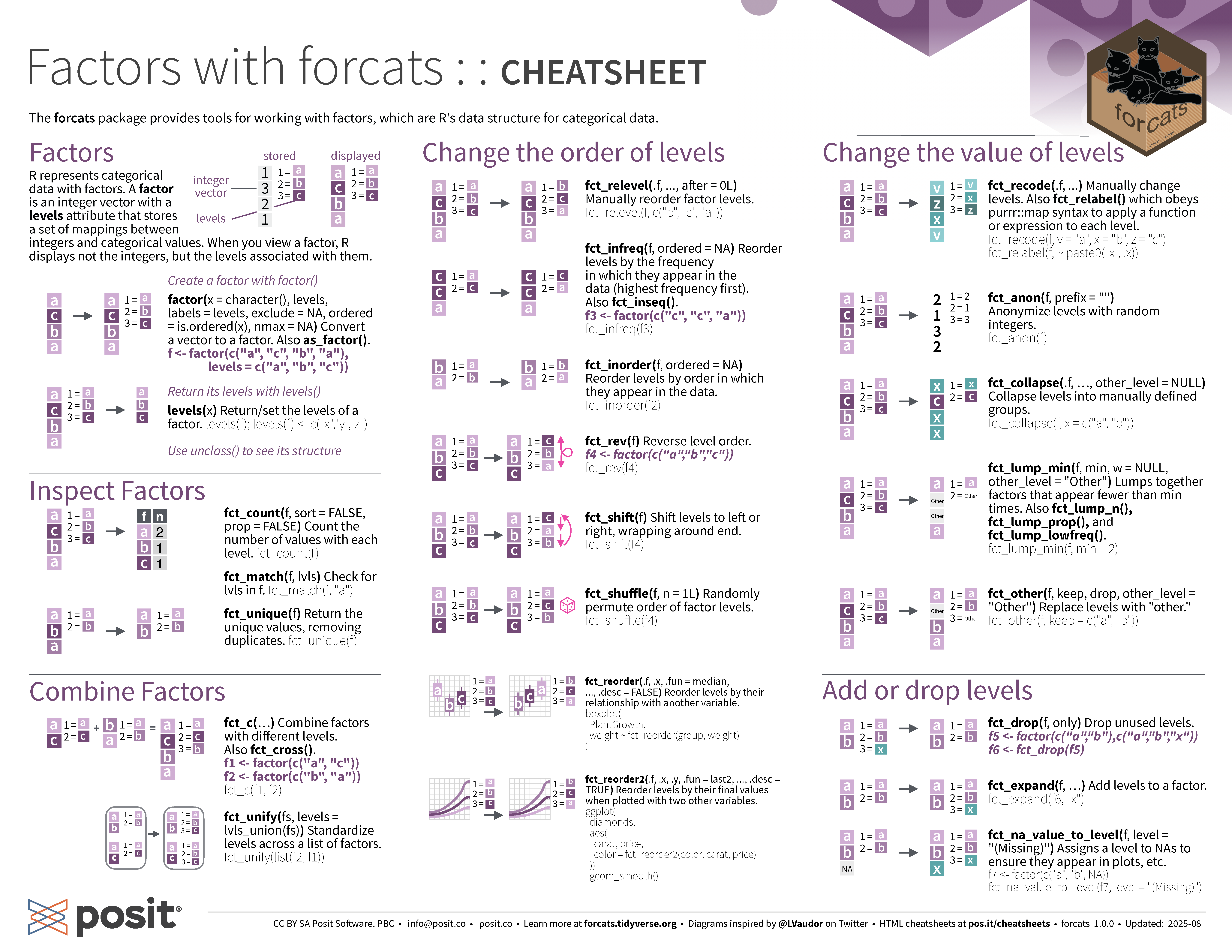
forcats cheatsheet
Dealing with Dates and Times
Date in R
- Dates in R have class
Date📅 even though it looks likecharacter🔢
- It’s actually a numerical value under the hood
Reference point for Date objects
1st January 1970 is a special reference point
Let’s have a look at the numerical value under the hood of
Dateobjects
Yup, the number under the hood is the number of days after (if positive) or before (if negative) 1st January 1970
And yes, you can use
as.Dateto convert objects toDate
Converting string to Date
- Dates do no have to be in the format of “YYYY/MM/DD” (in fact, there are many format in the wild)
- If it has a different format, then you can use the conversion specification with a “%” symbol followed by a single letter not quite regex, but like it
You can find some widely used conversion specification in documentation at
?strptimebut some depends on your operating systemBelow are some common ones:
%babbreviated month%Bfull month
%eday of the month (01, 02, …, 31)%dday of the month (1, 2, …, 31)
%yyear without century (00-99)%Yyear with century, e.g. 1999
System locale
- “aralık” is December in Turkey
- Let’s temorary set our system locale to Turkey
Date and Time in R: POSIXct
R has two main date-time classes in R:
POSIXctandPOSIXlt(avoid usingPOSIXltif possible)POSIX stands for Portable Operating System Interface
ctstands for calendar time
- 1970/01/01 00:00:00 UTC is a special reference point called Unix epoch and the above number is the number of seconds after Unix epoch
Date and Time in R: POSIXlt
POSIXltseems like it’s the same asPOSIXct
- But under the hood, it’s a list of time attributes
Time zone
- You can find the names of the time zones using
OlsonNames() - If you want to know which time zone your system is using:
Date in R with lubridate
- To convert string to a
Date, you can useymdand friends. E.g.
You might have guessed it but:
y= year,m= month, andd= day.
The order determines the expected order of its appearance in the string
Date and time in R with lubridate
- To convert string to
POSIXct, you can useymd_hmsand friends
y= year,m= month, andd= dayh= hour,m= minute, ands= second.
It’s remarkably clever!
The time has to be after date though.
Conversion to date and time with lubridate
Making Date from individual date components:
Making POSIXct from individual components:
Extracting date or time components with lubridate
Date and time modifiers
Durations
Durationis a special class inlubridate- Some convenient constructors for
Durationare:
Maths with Durations
- Day light saving started at Sun 4th Oct 2020 2AM in Melbourne
Period
Periodis a special class inlubridate- Constructors for
Periodare like forDurationbut without the prefix “d”:
Maths with Period
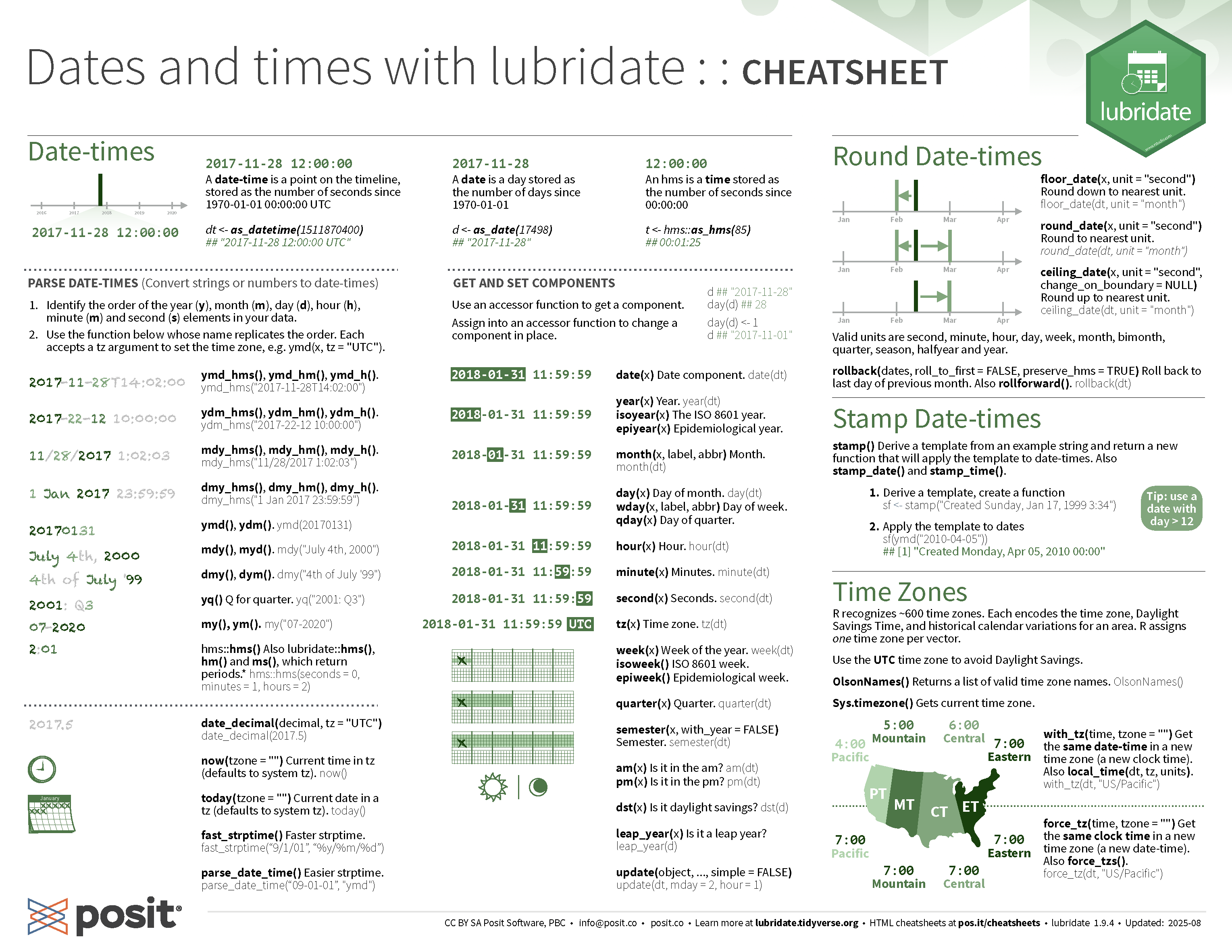
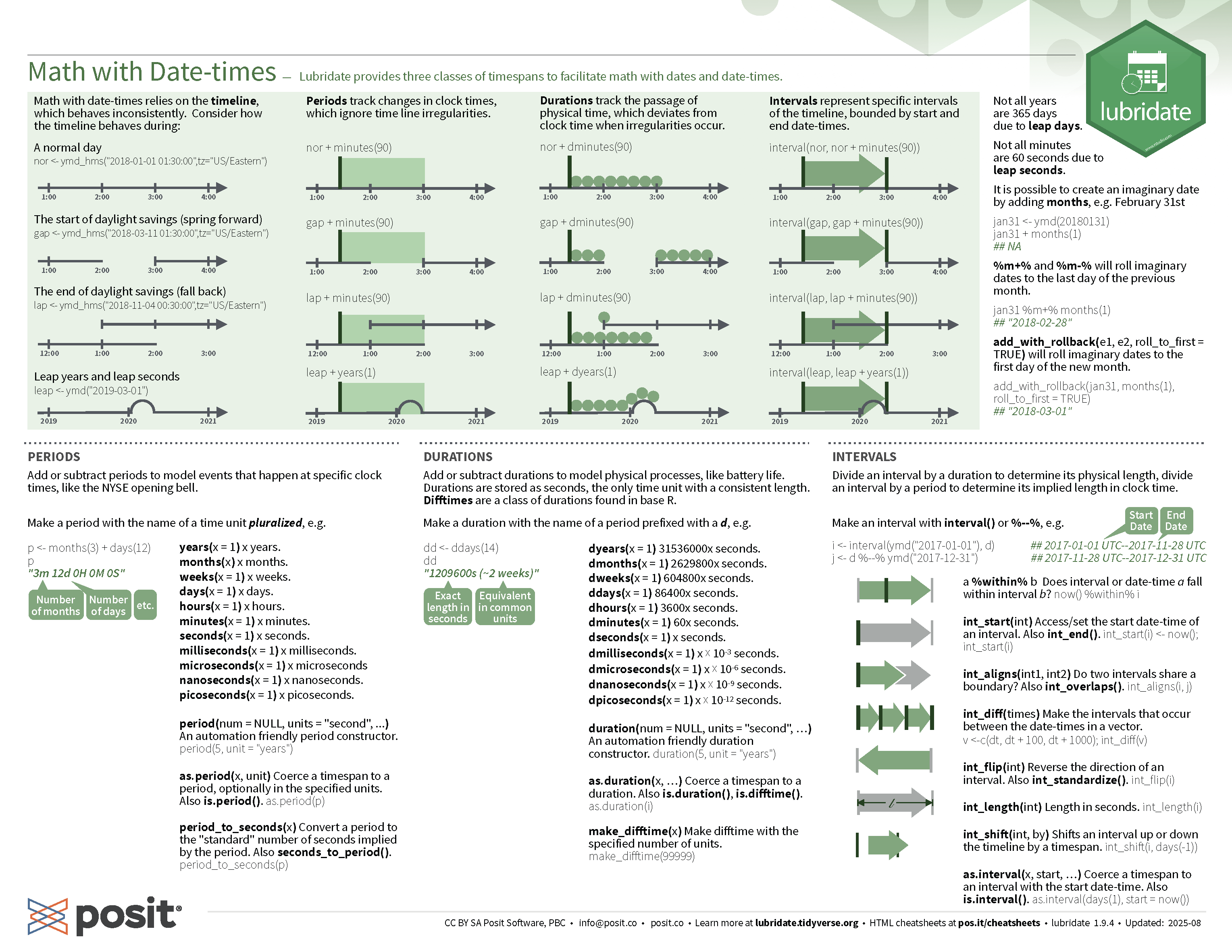
lubridate cheatsheet

STAT1003 – Statistical Techniques