[1] NADealing with dates and time
STAT1003 – Statistical Techniques
Dr. Emi Tanaka
Australian National University
These slides are best viewed on a modern browser like Google Chrome on a desktop or laptop. Some interactive components may require some time to fully load.
Date in R
- Dates in R have class
Date📅 even though it looks likecharacter🔢
- It’s actually a numerical value under the hood
Reference point for Date objects
1st January 1970 is a special reference point
Let’s have a look at the numerical value under the hood of
Dateobjects
Yup, the number under the hood is the number of days after (if positive) or before (if negative) 1st January 1970
And yes, you can use
as.Dateto convert objects toDate
Converting string to Date
- Dates do no have to be in the format of “YYYY/MM/DD” (in fact, there are many format in the wild)
- If it has a different format, then you can use the conversion specification with a “%” symbol followed by a single letter not quite regex, but like it
You can find some widely used conversion specification in documentation at
?strptimebut some depends on your operating systemBelow are some common ones:
%babbreviated month%Bfull month
%eday of the month (01, 02, …, 31)%dday of the month (1, 2, …, 31)
%yyear without century (00-99)%Yyear with century, e.g. 1999
System locale
- “aralık” is December in Turkey
- Let’s temorary set our system locale to Turkey
Date and Time in R: POSIXct
R has two main date-time classes in R:
POSIXctandPOSIXlt(avoid usingPOSIXltif possible)POSIX stands for Portable Operating System Interface
ctstands for calendar time
- 1970/01/01 00:00:00 UTC is a special reference point called Unix epoch and the above number is the number of seconds after Unix epoch
Date and Time in R: POSIXlt
POSIXltseems like it’s the same asPOSIXct
- But under the hood, it’s a list of time attributes
Time zone
- You can find the names of the time zones using
OlsonNames() - If you want to know which time zone your system is using:
Date in R with lubridate
- To convert string to a
Date, you can useymdand friends. E.g.
You might have guessed it but:
y= year,m= month, andd= day.
The order determines the expected order of its appearance in the string
Date and time in R with lubridate
- To convert string to
POSIXct, you can useymd_hmsand friends
y= year,m= month, andd= dayh= hour,m= minute, ands= second.
It’s remarkably clever!
The time has to be after date though.
Conversion to date and time with lubridate
Making Date from individual date components:
Making POSIXct from individual components:
Extracting date or time components with lubridate
Date and time modifiers
Durations
Durationis a special class inlubridate- Some convenient constructors for
Durationare:
Maths with Durations
- Day light saving started at Sun 4th Oct 2020 2AM in Melbourne
Period
Periodis a special class inlubridate- Constructors for
Periodare like forDurationbut without the prefix “d”:
Maths with Period
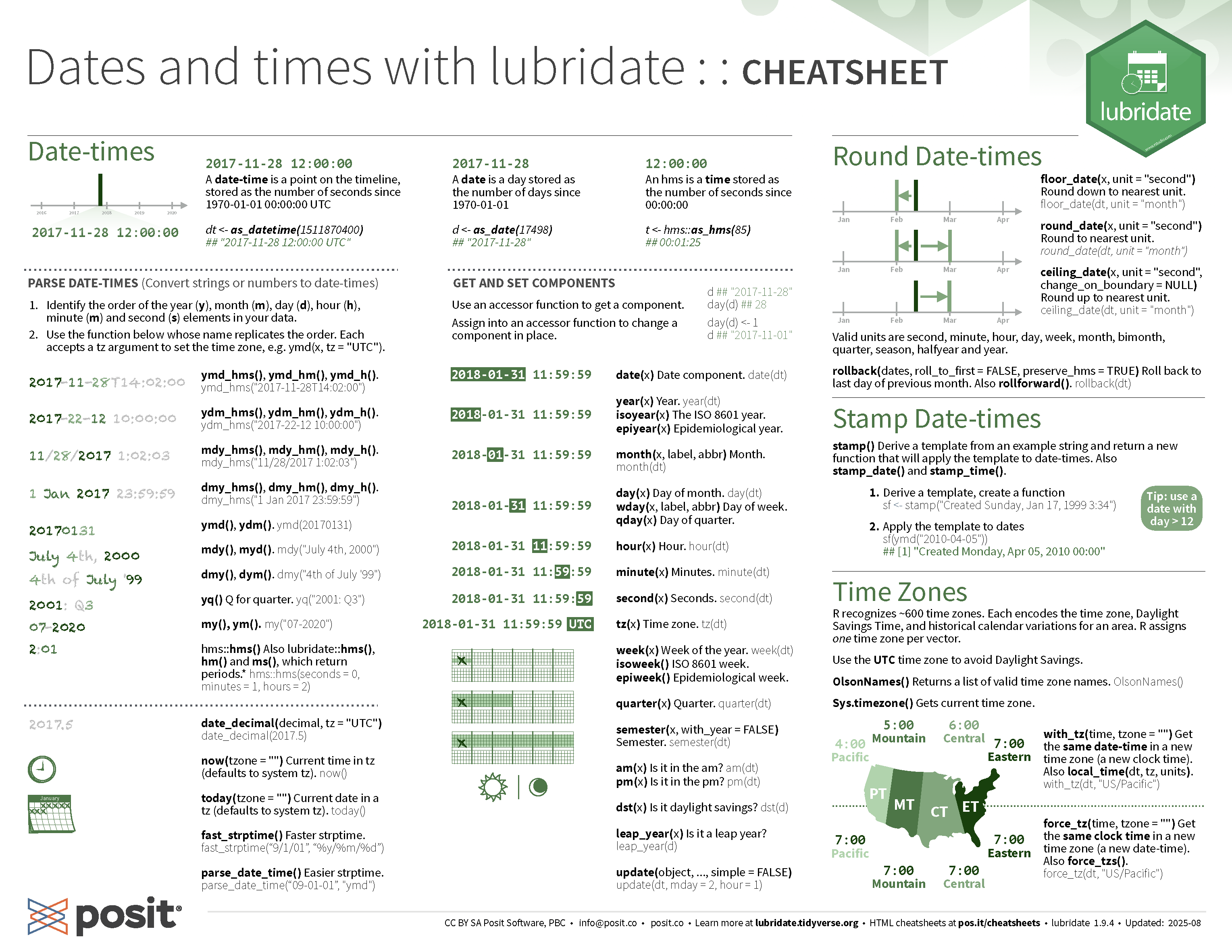
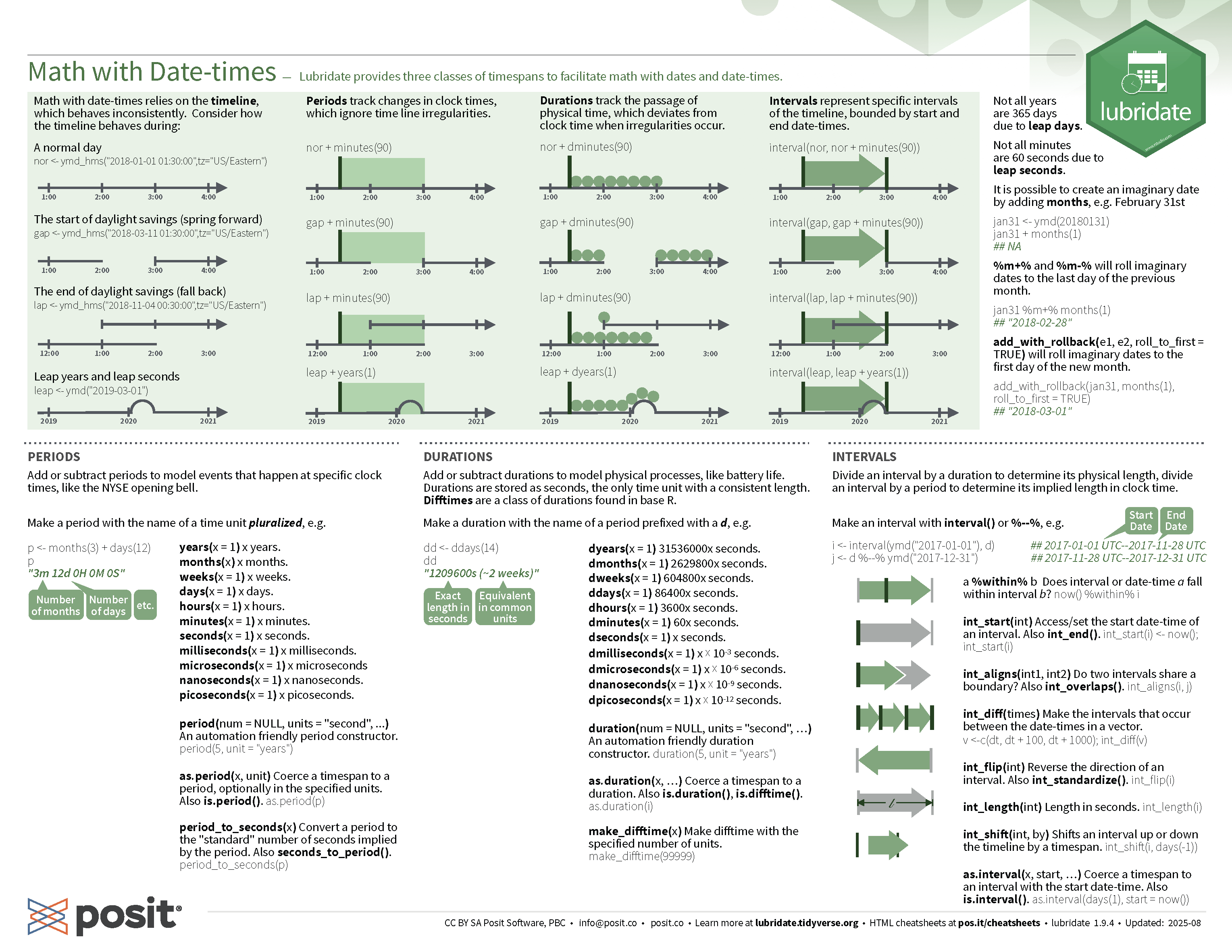
lubridate cheatsheet

STAT1003 – Statistical Techniques