Formatting factors

STAT1003 – Statistical Techniques

Dr. Emi Tanaka

Australian National University

These slides are best viewed on a modern browser like Google Chrome on a desktop or laptop. Some interactive components may require some time to fully load.

Categorical variables in R

  • In R, categorical variables may be represented as factors.
  • Then you have categorical variables that look like a numerical variable
    (e.g. coded variables like say 1=male, 2=female)
  • And also those that have fixed levels of numerical values
    (e.g. ToothGrowth$dose: 0.5, 1.0 and 2.0)

So why encode as [factor] instead of [character]?

  • In some cases, characters are converted to factors (or vice-versa) in functions so there may be no difference.
  • The main idea of a factor is that the variable has a fixed number of known levels.
  • This can be useful for:
    • Data integrity: It can help prevent errors by ensuring that only valid categories are used.
    • Memory efficiency: Factors can be more memory efficient than character vectors, especially when there are many repeated values.
    • Downstream analysis: A number of downstream analysis in R treat factors differently from characters.

Factors in R

  • When a variable is encoded as a factor then there is an attribute with the levels
  • You can easily change the labels of the variables:
  • Or make it an ordered factor:

Order of the levels in a factor

  • Order of the factors are determined by the input.

Why would the order of the levels matter?

  • Some downstream analysis may use it.

Numerical factors in R

as.numeric function returns the internal integer values of the factor

You probably want to use:

Defining levels explicitly

  • If the variable contain values that are not in the levels of the factors, then those values will become a missing value
  • This can be useful at times, but it’s a good idea to check the values before it is transformed as NA

Defining levels explicitly

  • You can have levels that are not observed
  • This can be useful at times downstream, e.g. 

Formatting factors

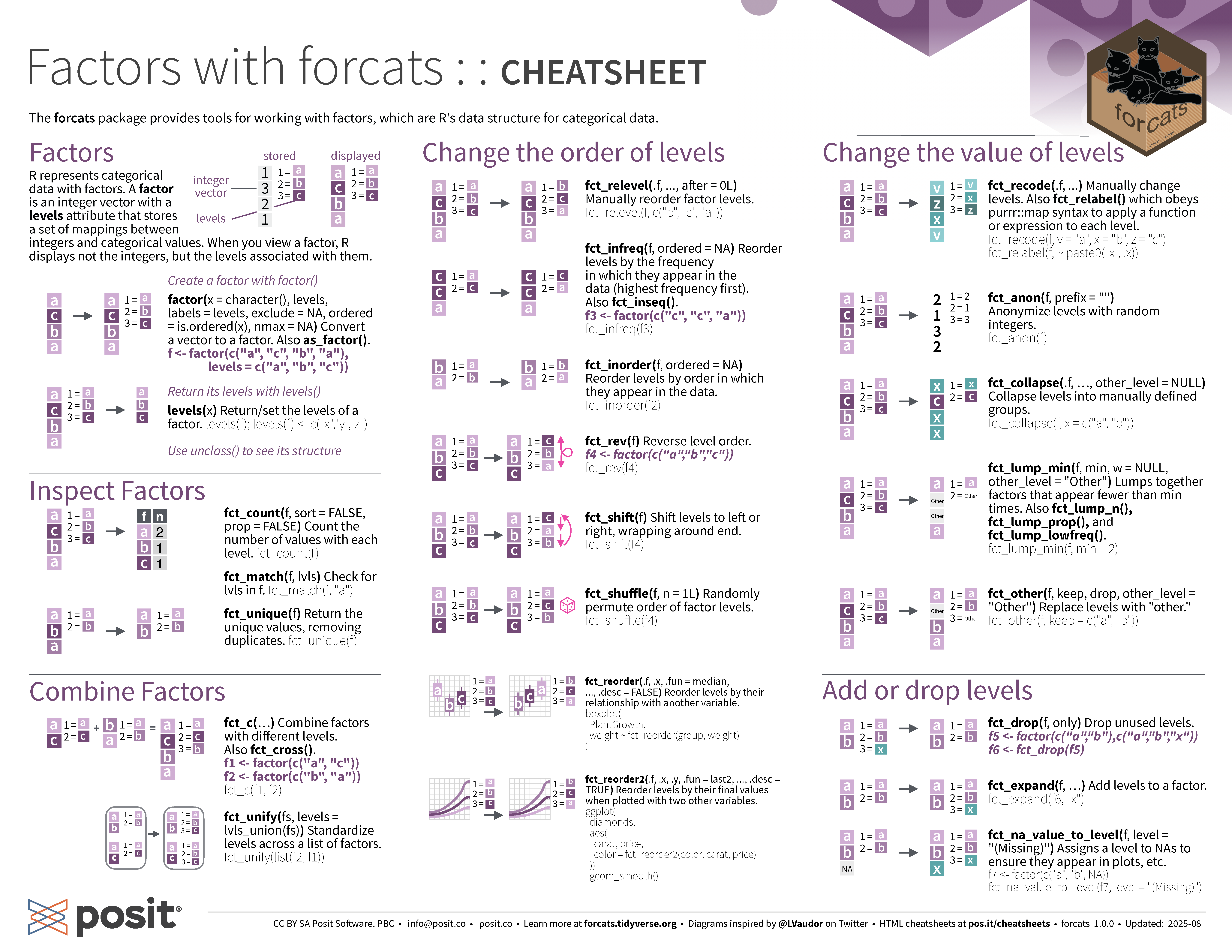
  • The forcats package is part of tidyverse
  • Like the stringr package the main functions in forcats prefix with fct_ or lvls_ and the first argument is a factor (or a character) vector
  • The list of available commands are:
  • fct_anon
  • fct_c
  • fct_collapse
  • fct_count
  • fct_cross
  • fct_drop
  • fct_expand
  • fct_explicit_na
  • fct_infreq
  • fct_inorder
  • fct_inseq
  • fct_lump
  • fct_lump_lowfreq
  • fct_lump_min
  • fct_lump_n
  • fct_lump_prop
  • fct_match
  • fct_na_level_to_value
  • fct_na_value_to_level
  • fct_other
  • fct_recode
  • fct_relabel
  • fct_relevel
  • fct_reorder
  • fct_reorder2
  • fct_rev
  • fct_shift
  • fct_shuffle
  • fct_unify
  • fct_unique
  • lvls_expand
  • lvls_reorder
  • lvls_revalue
  • lvls_union

Collapse levels in a factor

  • gss_cat is a dataset in forcats package from the General Social Survey (GSS) that contains a number of categorical variables.

Lumping factor levels

  • Sometimes you have a lot of levels and you’d prefer to lump some of them together to the “Other” category
  • What criterion do you use to lump levels together?
  • There are four main criterion to lump levels using fct_lump* functions:
    • fct_lump_n: lump all levels except the n most frequent
    • fct_lump_min: lump together those less than min counts
    • fct_lump_prop: lump together those less than proportion of prop
    • fct_lump_lowfreq: lump up least frequent levels such that the Other level is still the smallest level
    • fct_lump , it is better to use one of the above functions instead

Lumping factor levels in gss_cat dataset

forcats cheatsheet